
How to Cancel a Hosting Service (Without Losing Your Data or Domain)
If you no longer need a hosting plan, you can cancel it yourself from the client area. Do it in the right order, and you keep your files, your emails and — most importantly — your domain name.
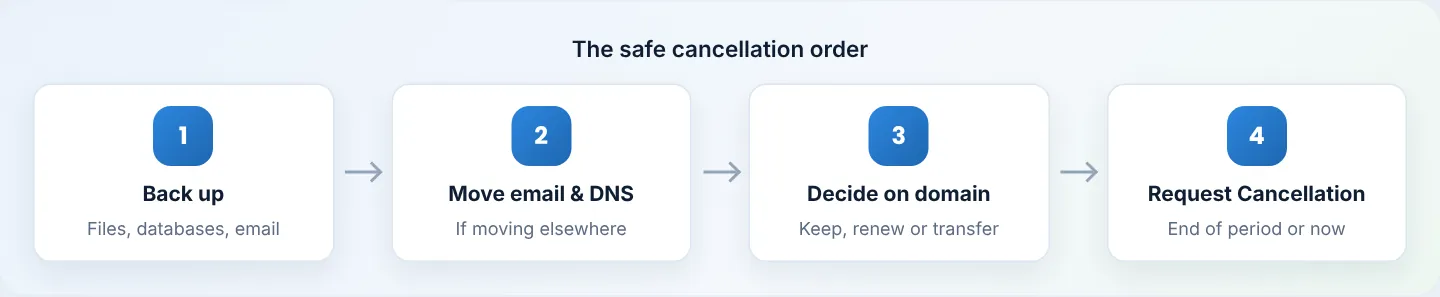
Before you cancel
1. Back up everything
- Files and databases: cPanel → Files → Backup Wizard → Back Up → Full Backup (or download a Home Directory backup and each database). See Backup Wizard.
- Email: emails on the server are deleted with the account. Copy them to another mailbox (e.g. add both accounts in Outlook/Thunderbird and drag folders across), or keep them on your computer via IMAP.
- Download the files to your computer — a backup left inside the account is deleted with it.
2. Moving to another host?
Set the website up at the new host first, then change DNS/nameservers, and wait a day or two for everything (including email) to arrive at the new place before cancelling.
3. Decide about the domain
Cancelling hosting does not cancel your domain — it's a separate service with its own renewal. Choose one:
- Keep it with us — leave it active, with Auto Renew on.
- Transfer it out — get the EPP/transfer code; see Transfer a domain out.
- Let it expire — only if you're sure; anyone can register it afterwards.
If your yearly plan included a free .co.ke domain, it's still registered in your name. It renews at the normal domain price — renew it, transfer it, or let it lapse deliberately. Never let a domain you've used for business email expire by accident.
Step 1: Request cancellation
client.braysons.co.ke → Services → My Services → click the plan → Request Cancellation (left menu, under Actions).
Step 2: Choose when
| Option | What happens |
|---|---|
| End of Billing Period (recommended) | The service keeps working until the next due date, then is cancelled. No renewal invoice is charged. |
| Immediate | The service is cancelled as soon as the request is processed. |
Add a short reason (it helps us improve) and click Request Cancellation.
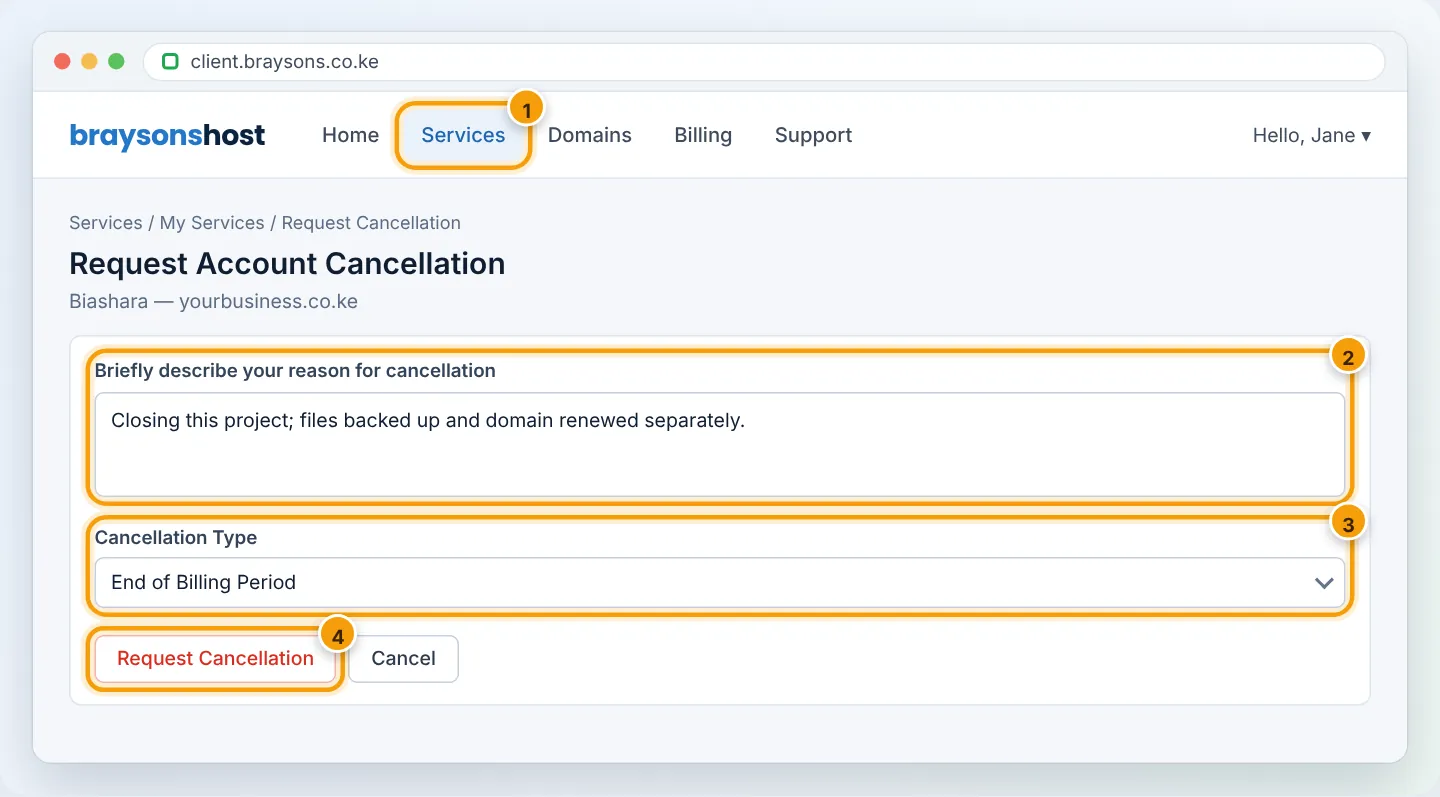
Step 3: Check the confirmation
You'll receive a confirmation email, and the service shows a cancellation requested notice. If there's an unpaid renewal invoice for the service, it's cancelled with the service — check under Billing → My Invoices.
Changed your mind?
Before the cancellation date, open a Billing ticket or WhatsApp +254 733 338 989 and we'll withdraw the request.
Refunds
Within 30 days of your first shared hosting purchase? You may qualify for a refund — see Request a refund. Otherwise, cancelling at the end of the period stops future charges.
Frequently asked questions
Is there a cancellation fee? No.
Will my data be kept after cancellation? Don't rely on it — back up before you cancel. Once cancelled, the account and its email are removed.
Can I cancel just one website? Cancel removes the whole hosting account (all websites on it). To remove one site, delete its domain and files in cPanel instead.
Figures are simplified illustrations. Your screen may look slightly different depending on your theme and the version of cPanel or the app you use.
Still need help?
Our Kenyan support team is on WhatsApp — real people, not bots. Mon–Sat, 8am–10pm EAT. Tickets are open 24/7.