
How to Get Your Domain's EPP (Transfer) Code
Your domain belongs to you. If you ever need to move it to another registrar, you need two things from us: the domain unlocked and its EPP code (also called auth code or transfer key). Here is how to get both yourself in the client area.
Thinking of leaving because of a problem? Talk to us first on WhatsApp +254 733 338 989 — we may be able to fix it quickly. If you still want to move, we will help you do it smoothly.
Before you start
- The domain must be active and not expired.
- Registered or transferred in the last 60 days? Most global extensions (.com, .net, .org…) cannot move until 60 days have passed.
- Check the registrant email under Manage → Contact Information. Codes and approval requests go there — update it if it is an old address.
- Decide about DNS. If your website stays on Braysons Host hosting, keep nameservers as
ns1.braysons.net/ns2.braysons.net. If you are moving hosting too, set up the new host first.
Step 1: Open the domain
Log in at client.braysons.co.ke → Domains → My Domains → click Manage next to the domain.
Step 2: Turn off Registrar Lock
Open the Registrar Lock tab. If it says Enabled, click Disable Registrar Lock.
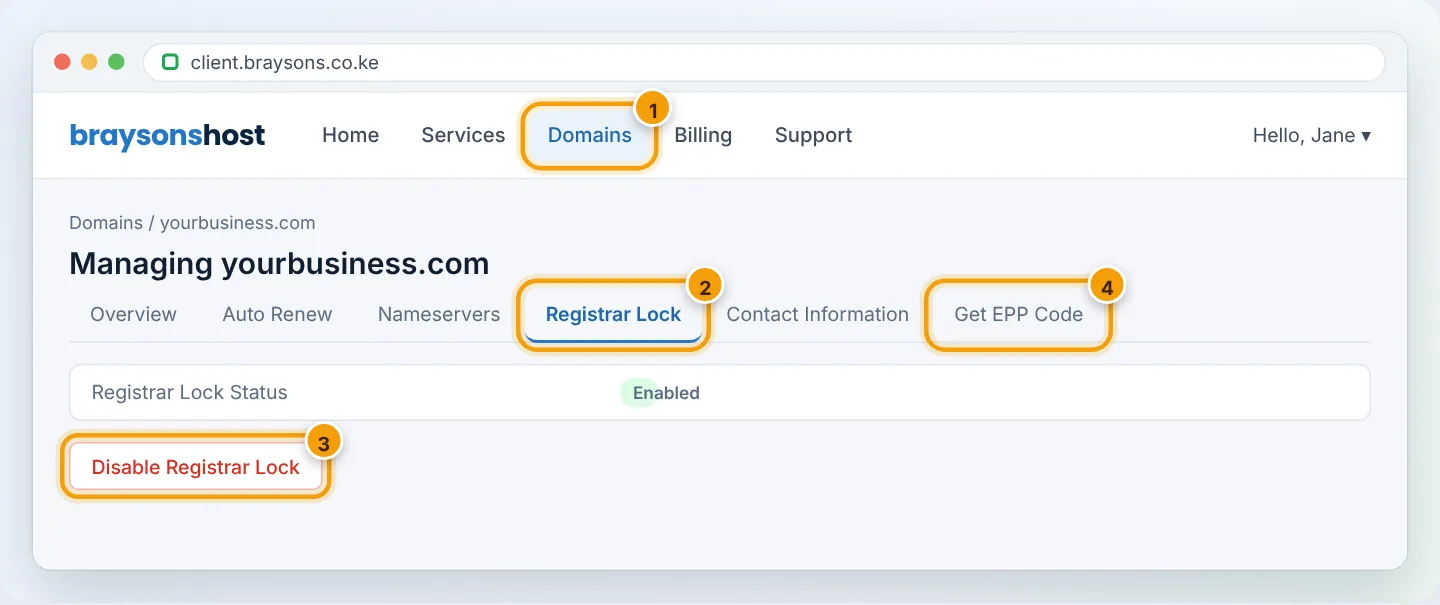
The lock protects against unauthorised transfers. Turn it back on if you change your mind or once the transfer is complete at the new registrar's side.
Some extensions — including many .ke domains — do not use a registrar lock; if the tab is missing, skip this step.
Step 3: Get the EPP code
Open Get EPP Code (sometimes under Management Tools). Depending on the extension:
- the code is shown on screen — copy it, or
- it is emailed to the registrant email — check that inbox (and spam).
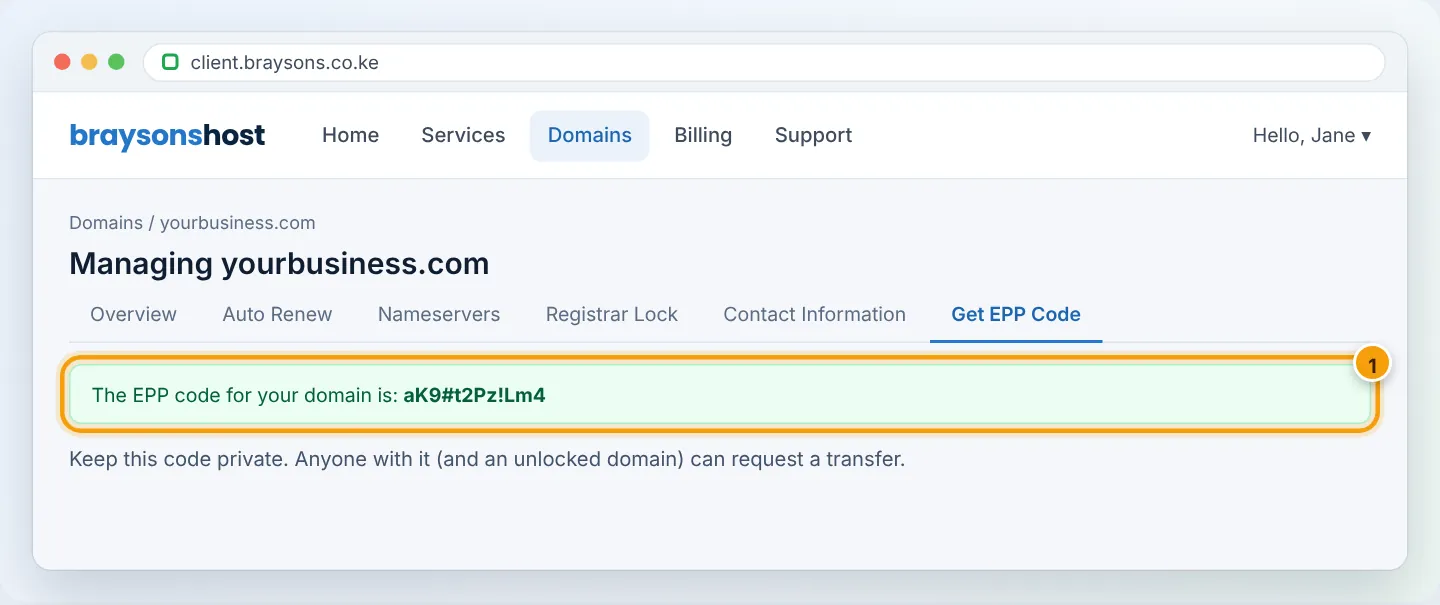
If the option is not available for your domain, open a ticket (Support → Open Ticket, department Domains) from your registered email and we will send the code to the registrant.
Step 4: Start the transfer at the new registrar
Give the new registrar the domain name and EPP code and pay their transfer fee. You may receive an email asking you to approve the transfer — click the link. Transfers usually complete within 5–7 days.
Step 5: After the transfer
- The domain disappears from your Braysons client area once complete.
- Website and email keep working as long as the nameservers are not changed.
- If your hosting stays with us, keep paying the hosting plan as normal. If you are leaving hosting too, download a full backup first — see Backup Wizard.
Troubleshooting
| Problem | Cause | Fix |
|---|---|---|
| New registrar says “invalid code” | Typo, extra space, or code changed | Copy it again; request a new one |
| “Domain is locked” | Registrar lock still enabled | Disable it and wait 10 minutes |
| No email with the code | Registrant email outdated or in spam | Update Contact Information, then request again |
| “Transfer prohibited — 60 days” | Recent registration/transfer | Wait until 60 days have passed |
Frequently asked questions
Is there a fee to transfer out? We do not charge to release a domain. The new registrar charges its own transfer fee.
Will I lose my remaining registration time? For most extensions, no — time carries over and the new registrar usually adds a year.
Figures are simplified illustrations. Your screen may look slightly different depending on your theme and the version of cPanel or the app you use.
Still need help?
Our Kenyan support team is on WhatsApp — real people, not bots. Mon–Sat, 8am–10pm EAT. Tickets are open 24/7.